 Daily Dictate
Private by design
Recordings are turned into text on your computer and discarded right after. Nothing is uploaded, stored or logged.
Press a shortcut, speak, and your words appear in any text box: email, chat, forms, notes and AI chats. Daily Dictate runs the Whisper speech model inside Chrome, on your own device. Your audio is never uploaded.
Free for 15 minutes a day. Pro unlocks unlimited dictation. Works in desktop Chrome 120 or newer.
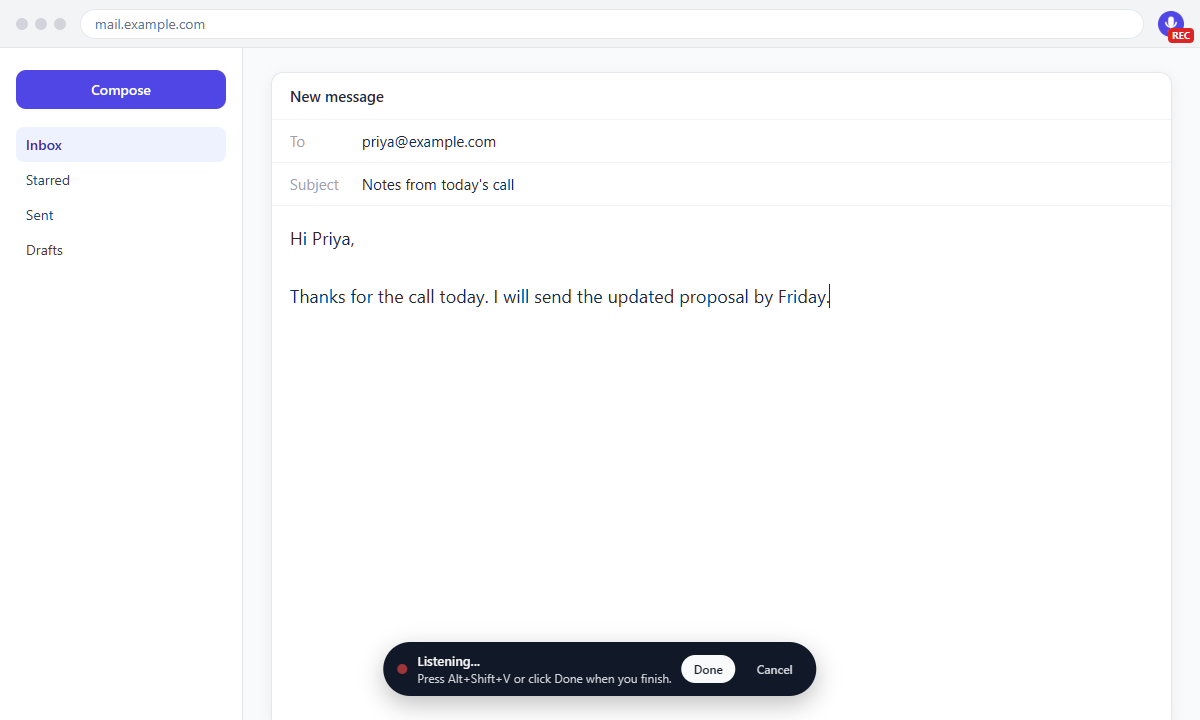
Recordings are turned into text on your computer and discarded right after. Nothing is uploaded, stored or logged.
Most text boxes and editors on the web: email, chat, forms, notes, social posts and AI chats.
The speech model downloads once (40 MB to 560 MB, depending on the quality you pick). After that, no internet is needed.
English on the free plan. Pro adds Hindi, Bengali, Tamil, Telugu, Marathi, Gujarati, Urdu, Spanish, French, German, Portuguese, Italian, Dutch, Russian, Arabic, Japanese, Korean and Chinese.
Filler words like "um" and "uh" are removed. Say "new line" or "new paragraph" as you talk.
Uses your graphics card through WebGPU when it can, and your processor when it cannot.
$0
$4.99/month
or $39 a year, or $79 once for life
Prices are in US dollars; local taxes are added at checkout. Payments are handled by Dodo Payments, our merchant of record. 14-day money-back guarantee, see the refund policy.
No. Audio is recorded only while you dictate, turned into text inside Chrome on your computer, and then discarded. Daily Dictate has no servers that receive your audio or your text.
Speech recognition runs on your device, so the model has to be stored there. It downloads once from Hugging Face and stays in Chrome's storage for offline use.
Most text boxes and rich editors. Google Docs is not supported yet because it draws its text on a canvas. Chrome does not allow extensions on a few pages, such as the Chrome Web Store and chrome:// pages.
19 languages. English is included in the free plan and the other 18 come with Pro. English uses a dedicated English model, which is more accurate for English.
Pick a plan above. After paying, you get a license key on the confirmation page and by email. Open the Daily Dictate setup page (right-click the Daily Dictate icon in Chrome and choose Options), paste the key under Your plan and click Activate.
We emailed it to you right after you bought Pro, so first search your inbox and spam folder. You can also open the customer portal, enter the email address you used to buy and open the sign-in link we send you. The portal shows your license key and invoices, and lets you manage your subscription.
Yes. Install Daily Dictate there and activate the same key under Your plan, as you did the first time. One key works in up to 3 Chrome browsers at once. Before you stop using a computer, reset it or uninstall Daily Dictate, click "Remove Pro from this browser" on the Daily Dictate setup page to free that spot. If Daily Dictate says your key is already active on the maximum number of browsers and you can no longer remove it, email us from the address you used to buy and we will free up a spot for you.
Yes. Cancel any time with the link in your receipt email or in the customer portal, and Pro stays active until the end of the period you paid for. If Pro is not right for you, email us within 14 days of buying for a full refund.
Only to activate your key and, every few days, to confirm it is still valid. Dictation itself always runs on your computer, and no audio or text is ever sent.
Usually a few seconds or less, depending on the model you pick and your computer. A graphics card makes it faster.
Open chrome://extensions/shortcuts in Chrome and set a new shortcut for Daily Dictate.